Welcome to Dead Simple Auto
Dead Simple Auto is fleet management software for people who rent out cars and want to know, without ceremony, three things: where every car is, what it is earning, and what it is costing. It is built for independent rental operators running roughly 5 to 50 cars, for Turo and Getaround hosts who want their own books and their own booking link. It is a cloud service, hosted by us: sign in from a browser and run your fleet — there is nothing to install and nothing to maintain.
The philosophy
Three ideas run through everything in this manual.
Track what cars earn and what they cost. Revenue is the easy half. Dead Simple Auto also carries the unglamorous half — loan payments, insurance, depreciation, tolls, parts, the shop invoice you photographed in a parking lot — down to the individual vehicle, so an idle financed car shows its loss instead of hiding in a fleet average. The Money chapter covers this in full.
Evidence that holds up. Condition photos are captured in a guided flow and compared angle-for-angle at close. Agreements are e-signed with the signer’s IP recorded. GPS trails come from the car, toll statements from the agency’s own file, and odometer readings from a photograph of the dash — not from a form field. When a charge is disputed, you can build a single hashed PDF packet out of all of it.
Nothing is charged automatically. Fuel shortfalls, late returns, tolls, damage findings, and policy breaches all become suggestions — line items a human looks at and approves or discards. The software never moves money on its own. In the same spirit, remote immobilisation reports what actually happened — requested, queued, sent — and never claims a car is disabled just because a flag was written somewhere.
The three parts of the system
Dead Simple Auto is one product with three faces.
The web dashboard is where you, the operator, live. Everything in this manual happens here unless it says otherwise.
Guest-facing public pages are what your renters see, on links you send them: your direct booking portal, the in-trip hub with vehicle facts and roadside reporting, self-service pickup and return, damage reports, and the settlement statement with its per-line “question this charge” route. Guests never log in to your dashboard and never see anyone else’s data. Guest-facing pages are available in English, Spanish, French, German, and Portuguese.
The field-staff mobile app (iOS and Android) is for whoever is physically at the car — scanning QR codes, photographing odometers, working through job checklists. It is deliberately lightweight: essentials for the person in the parking lot, not a phone-sized copy of the dashboard.
Finding your way around
The left navigation starts with five pinned items — the ones you touch daily, in the order a day usually goes: Dashboard, Day Board, Jobs, Alerts, and Messages. Alerts and Messages carry live count badges so you can see from anywhere that something is waiting.
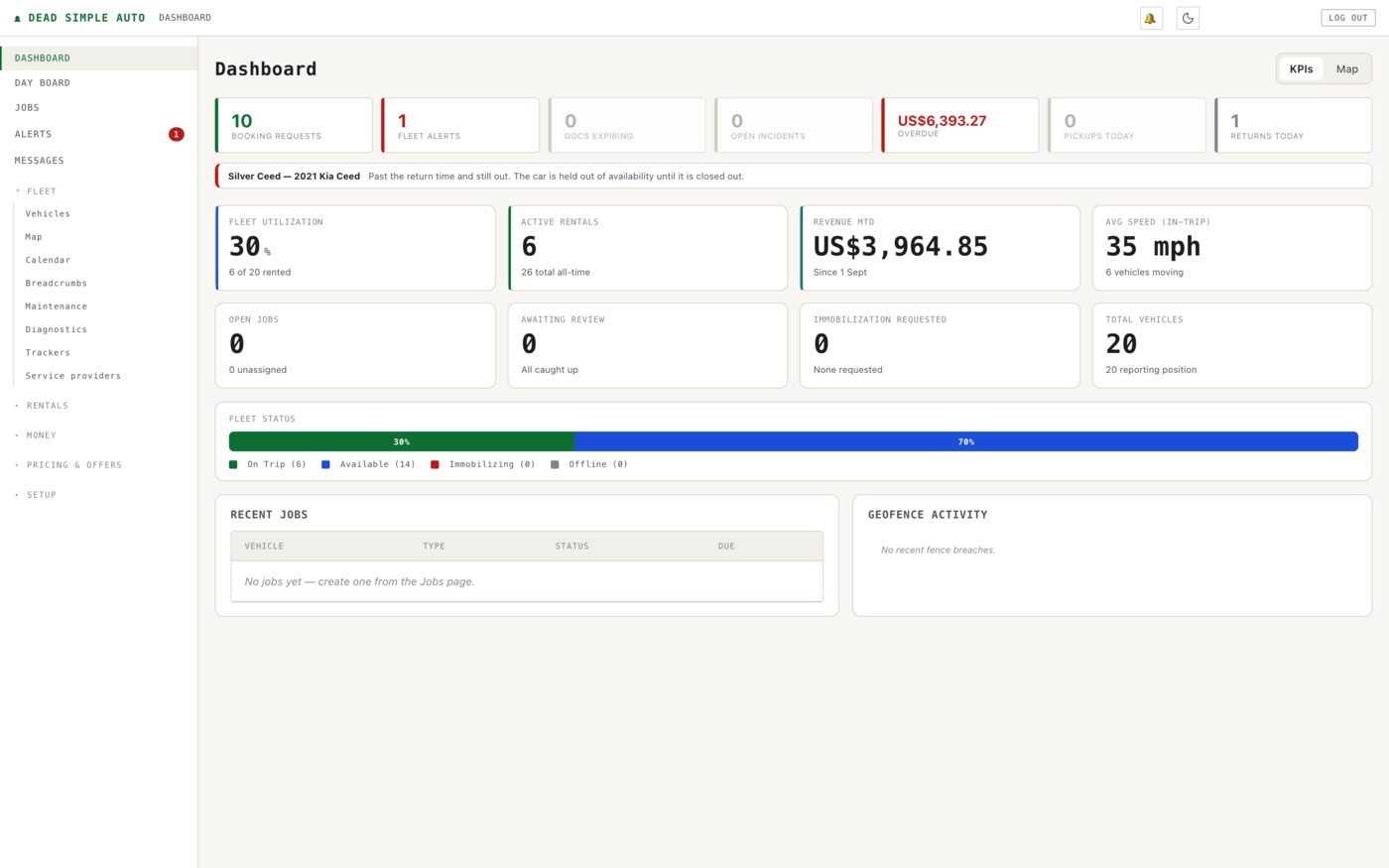
The dashboard leads with attention, not vanity metrics. The top strip counts the things that need a decision from you — booking requests, fleet alerts, expiring documents, open incidents, overdue money, and today’s pickups and returns — and anything urgent, like a car past its return time, gets its own banner underneath.

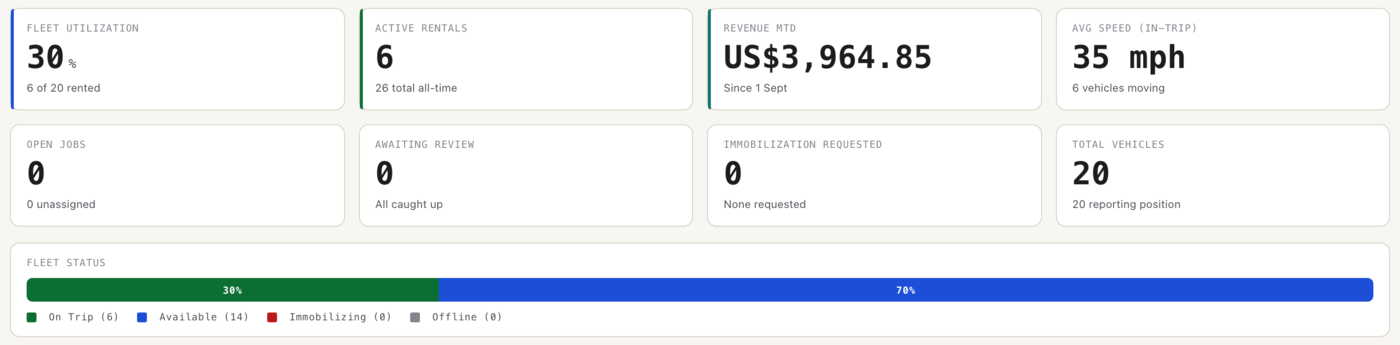
Below that come the operating numbers: fleet utilization, active rentals, month-to-date revenue, open jobs, and a fleet status bar showing how many cars are on trip, available, immobilizing, or offline at this moment.
The rest of the navigation is grouped by what you are doing, not by database table:
| Group | What lives there |
|---|---|
| Fleet | Vehicles, Map, Calendar, Breadcrumbs, Maintenance, Diagnostics, Trackers, Service providers |
| Rentals | Rentals, Bookings, Customers |
| Money | P&L, Reports, Receivables, Collections, Tolls, Toll auditor |
| Pricing & offers | Dynamic pricing, Promo codes, Referrals, Add-ons |
| Setup | Settings, Team, Usage policies, Workflows, Imports, Turo unmatched, Notifications |
Fleet is the physical cars: the register, the live map, the availability calendar, GPS breadcrumb trails, and everything that keeps cars running. Rentals is the business of putting cars out and getting them back. Money is what happened and what you are owed. Pricing & offers is kept separate from Money on purpose — reading the past and changing the future are different jobs. Setup is touched once and forgotten; if you are in there weekly, something is wrong.
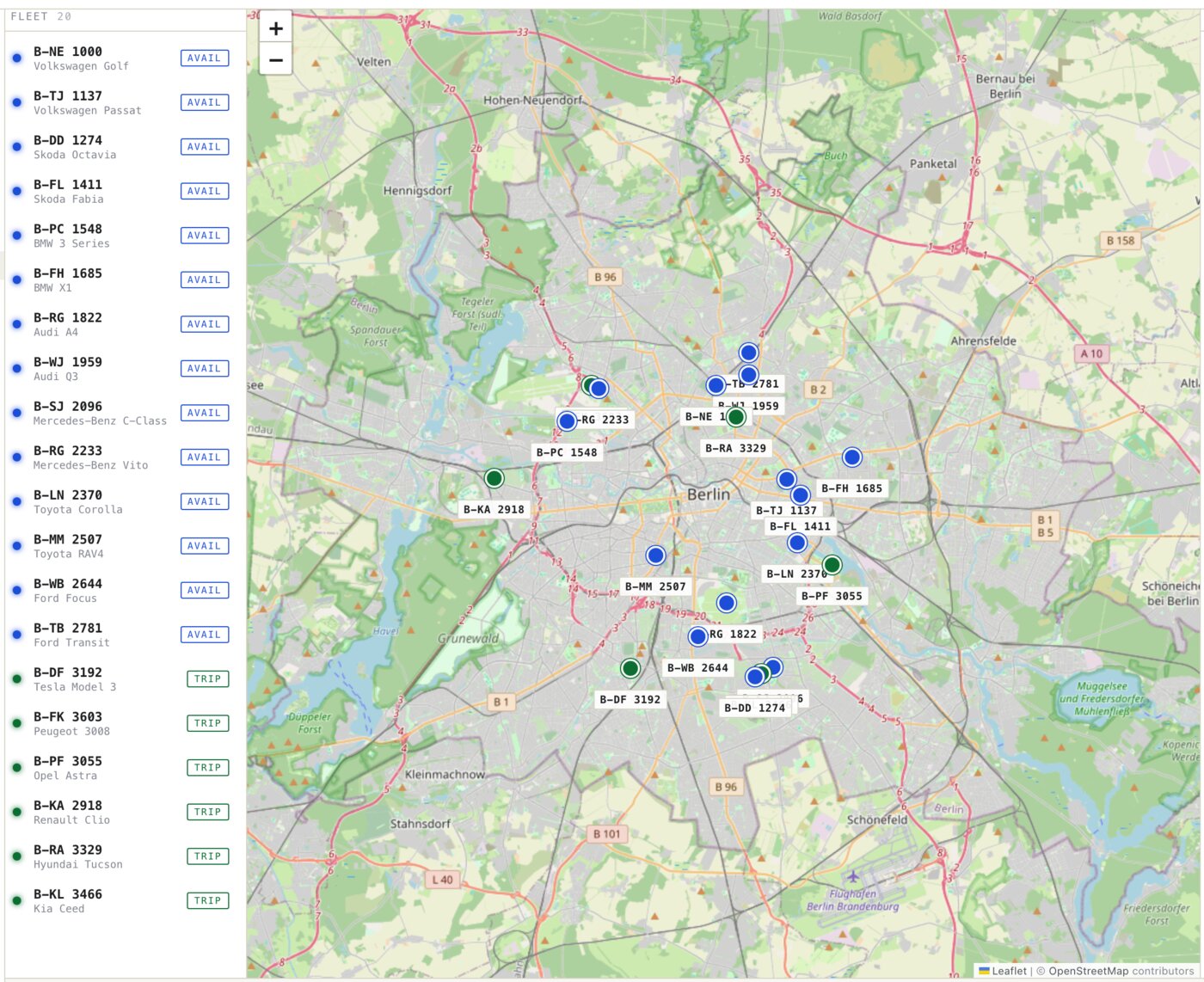
Under Fleet → Map you get every reporting car on one map, with the fleet listed alongside and each car flagged as available or on trip. Clicking a car shows its details in the panel on the right.
Note: Screenshots in this manual show a seeded demo fleet. Your plates, cars, and numbers will differ; the screens will not.
Knowing where the cars are
Position data comes from hardware you choose per vehicle, and the software treats all of it the same:
- An OBD-II dongle plugs into the diagnostic socket in thirty seconds and reads what only the engine knows — fault codes, check-engine status, and fuel level straight off the bus. A renter can unplug it.
- A hardwired GPS tracker is wired behind the dash, out of sight and out of reach. This is the option for cars that go out to strangers.
- An old Android phone in the glovebox reports position only. Honest use: proving the idea before you buy hardware.
- An immobiliser relay, fitted by an auto electrician alongside a hardwired tracker, lets you disable a stationary car remotely. Wired correctly it fails safe — a dead tracker still starts the car — and a command issued while the vehicle is moving is held, then sent only once the car has stopped. Not as an option, not behind a warning: the product will not stop a moving car.
Fitting, protocols, and the safety reasoning are covered in the Telematics chapter.
Note: You can run Dead Simple Auto with no hardware at all. Rentals, bookings, money, and maintenance all work without GPS — you just lose the map, the trails, and everything derived from them.
Where to go next
If you are setting up from scratch, continue in order: the next chapters walk through adding your vehicles, connecting trackers, and taking your first booking. If you imported history from Turo or Getaround, your past rentals are already feeding the P&L — start with the Money chapter to see what your fleet has really been earning.