Telematics and Hardware
Dead Simple Auto works fine with no hardware at all — you can run bookings, money and maintenance on nothing but a calendar. But most of what makes the product useful on the day a rental goes wrong (where is the car, did it enter a restricted zone, how many kilometres did it really do, did it use a toll road) comes from a tracking device in the vehicle. This chapter covers the three ways to fit one, the pages that show what it reports, and the features built on top of the data.
Three ways to track a car
You pick per vehicle. The software treats all three the same once the data arrives.
| Method | Hardware cost | Gives you | Removable by a renter |
|---|---|---|---|
| OBD-II telematics dongle | Low | GPS, fault codes, odometer, fuel, voltage | Yes — it unplugs |
| Hardwired GPS tracker | Low, plus fitting | GPS, ignition sense, immobiliser option | Not without tools and time |
| Android phone (companion app) | Zero | Position only | Trivially |
OBD-II telematics dongle. Plugs into the diagnostic socket under the dash — no wiring, no trim removal, no auto electrician. Beyond position, it reads what only the engine knows: fault codes, check-engine state, coolant temperature, fuel level and the odometer straight off the bus, so mileage is not a number someone typed in. It fits almost anything on the road: OBD-II has been mandatory in the US since 1996, and in the EU since 2001 for petrol and 2004 for diesel. We supply the dongle pre-configured — plug it in and it starts reporting. The honest downside: a renter can unplug it in five seconds.
Hardwired GPS tracker. Wired behind the dash to permanent 12V, ignition sense and ground — concealed, always powered, out of reach. This is the one for cars that go out to strangers. We supply the tracker pre-configured and ready to fit; it reports position, ignition and power state the moment it has power. Add the immobiliser relay (below) and the same unit can cut a circuit on command.
An Android phone. An old handset in the glovebox running our companion tracking app reports position over whatever data connection it has. No engine data, and it stops when the battery does. Its honest use is proving the idea — tracking a car you are about to sell, or a fleet you are still deciding about — before you spend money on hardware.
The Trackers page
Devices are managed at Fleet → Trackers. Each row is one physical device: its IMEI or identifier, its type, where its data comes from, the external ID that ties it to the GPS backend, whether it has an immobiliser fitted, and its current status. The counters across the top show total, active and immobiliser-equipped devices at a glance, and Add Tracker registers a new one. Tying a device to a car happens on the vehicle itself: open the vehicle’s detail page and use Register Tracker (or Replace Tracker) with the device’s IMEI — the Trackers page stays in sync automatically.
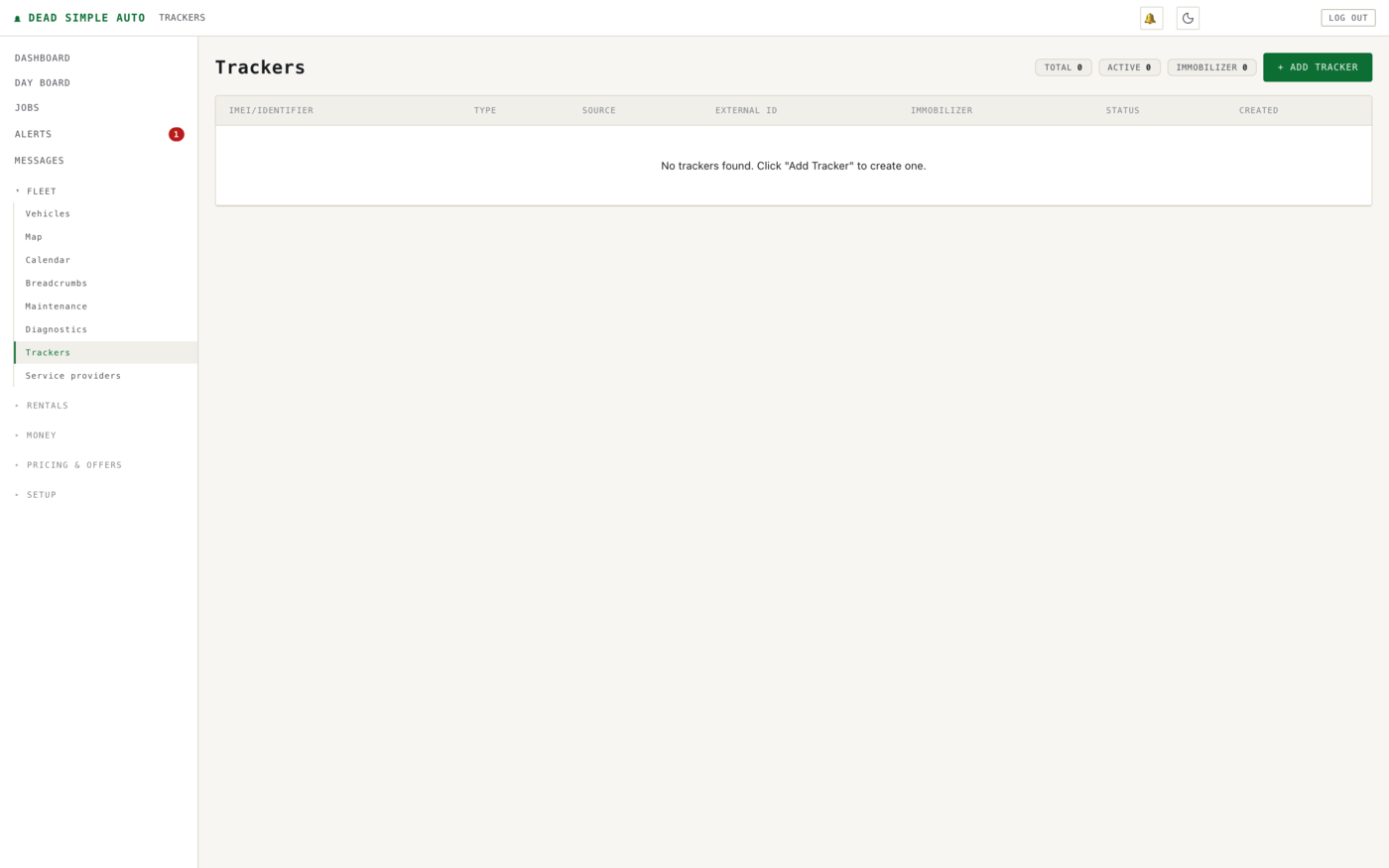
Once a tracker is registered against a vehicle, its positions feed the live Fleet → Map, the per-vehicle and per-rental trails under Fleet → Breadcrumbs, and everything else in this chapter.
Engine diagnostics
Fleet → Diagnostics talks to our OBD-II dongles that are currently online. Select a device and you can run a remote fault-code scan — stored, pending and permanent codes (OBD modes 03, 07 and 0A) plus battery voltage — and clear codes remotely. A clear must immediately follow a successful scan, and every clear is recorded in an audit log you can export. If no device is online, the page says so rather than showing stale data.

The same devices also stream coolant temperature, fuel level, check-engine state and the odometer continuously into telemetry — the stream that keeps the odometer honest for mileage-based maintenance schedules (see the Maintenance chapter) and mileage reconciliation (below).
The immobiliser (killswitch)
The immobiliser is a normally-closed relay, fitted at the fuse box by an auto electrician and driven by the tracker’s relay output. Normally closed matters: if the relay, the tracker or its wiring fails, the car still starts. On most cars the interrupt goes in the starter circuit — the professional convention, and the one that cannot stall a moving engine. A fuel-pump interrupt, where used, is done at the relay socket in the fuse box, never out at the pump.
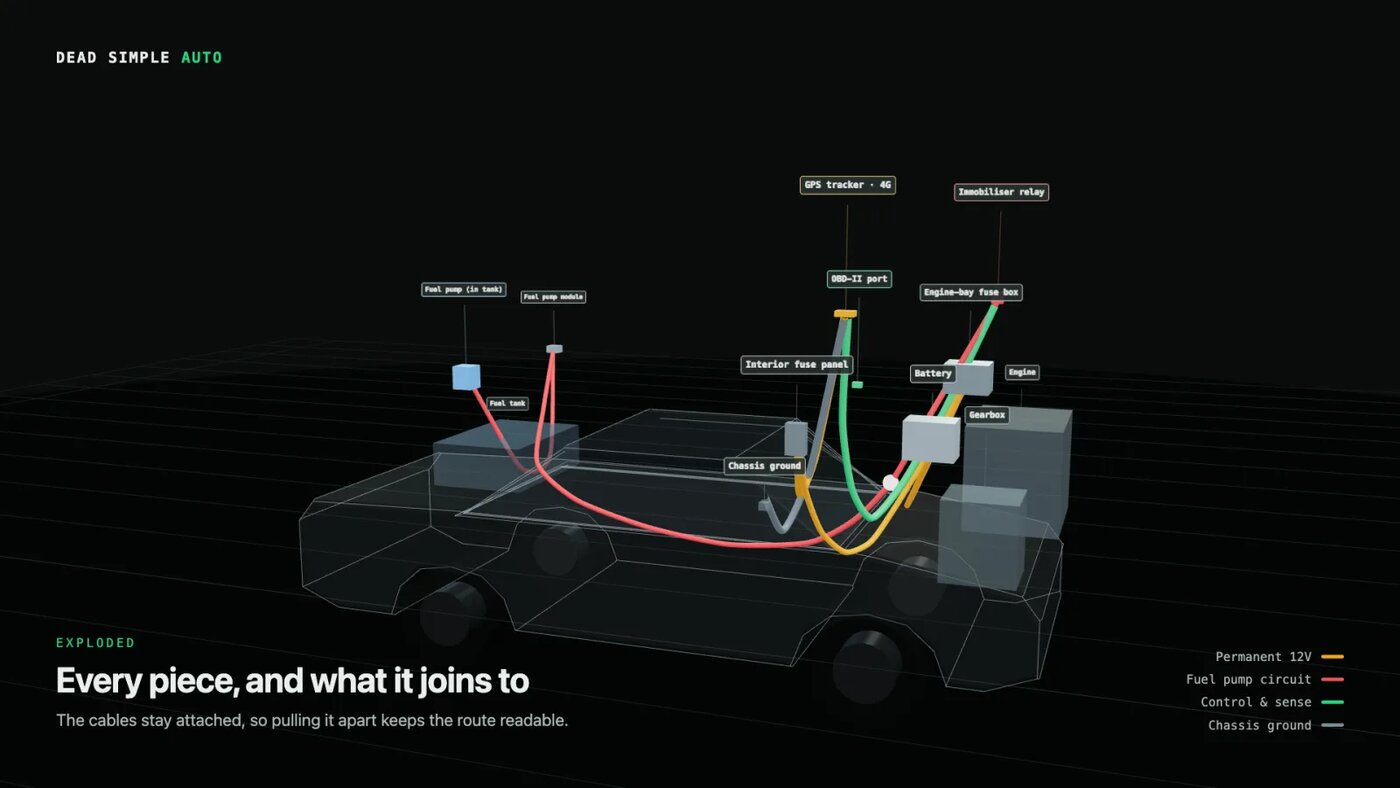
It is a short job because almost nothing crosses the engine bay: permanent 12V, ignition sense and a factory ground point are all within reach of the driver’s knee panel, so only the low-current relay control wire runs forward.
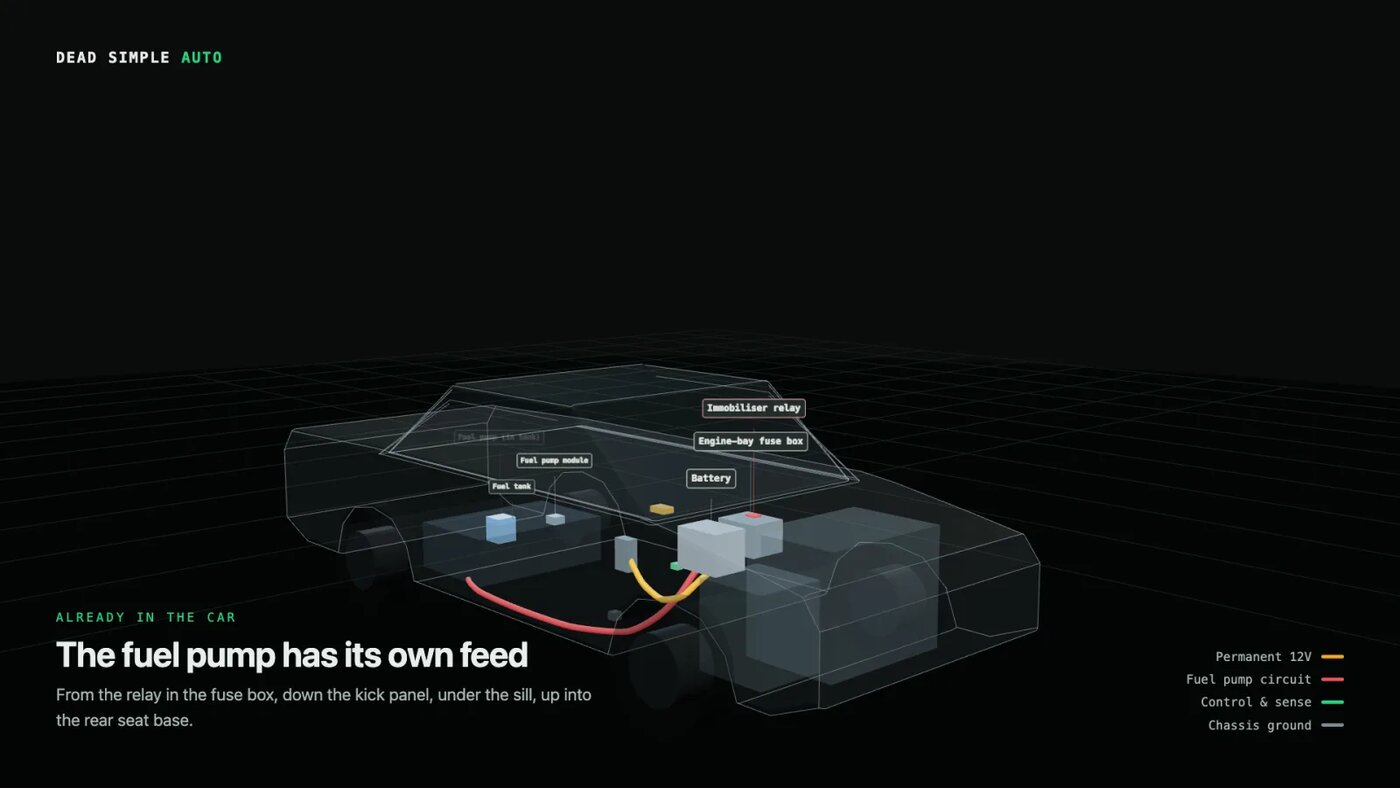
Two things the product is blunt about:
- It reports what actually happened. An immobilise command moves through requested → queued → sent → confirmed → failed, and the interface shows the real state. It never claims a car is disabled because a flag was written in a database. If a vehicle has no immobiliser-capable hardware, it says so instead of pretending.
- It will not stop a moving car. A command issued while the vehicle reports motion is not dispatched — it is held as queued and sent only once telemetry shows the car has stopped. Cutting power at speed loses the driver power steering and then brake servo assist; the product does not offer it — not as an option, not behind a warning.
Immobilisation also backs the collections escalation under Money → Collections, where it always requires explicit admin approval (see the Money chapter).
Note: Wiring is a job for an auto electrician, not for you. The diagrams here show where things go on a typical car; every model differs.
Usage policies
Setup → Usage policies is where GPS data turns into enforcement. It is off by default. When you switch on usage-policy detection, every rental is swept at return: the trip’s GPS trail and odometer are checked against your policies, and any breach is logged to a durable policy-breach ledger, feeds a deposit-deduction suggestion, and raises a fleet alert that clears when you settle the deposit.

Three kinds of breach are detected:
- Restricted zones — geofences you tag as restricted (drawn on the map under Setup → Settings, Geofences tab); the sweep checks whether the trail entered one.
- Mileage overage — distance driven beyond the rental’s per-day cap.
- Off-site return — the car’s last fix is nowhere near one of your lots.
Breaches never charge anyone. Like everything else in the product, they become suggestions on the deposit panel that a human approves (see the Money chapter). The same page also holds the recovery-charge rates (fuel shortfall, late return) and the eligibility gate, covered in their own chapters.
Mileage reconciliation and toll early warning
Two more checks ride on the same data. Mileage reconciliation (a toggle under Setup → Settings) runs when a rental closes: it cross-checks the odometer delta the readings claim against the distance the GPS trail actually measured, catching odometer rollbacks and under-reported returns. A discrepancy is flagged as an incident with a notification — nothing is charged, and it never blocks the close. And toll-road early warning watches the GPS trail as a rental closes: if the car appears to have used a toll road, the rental is flagged and a fleet alert raised before the agency statement lands weeks later — so you can hold the deposit instead of chasing a guest who has long gone. Statements are then imported and matched under Money → Tolls, and cross-checked charge-by-charge under Money → Toll auditor (see the Money chapter).