Money
Everything about what your fleet earns, what it costs, and what renters still owe you lives in the Money section of the left navigation: P&L, Reports, Receivables, Collections, Tolls, and Toll auditor. A few money features live where the money actually happens instead — security deposits and recovery billing on the rental itself, expenses on the vehicle.
One rule runs through all of it: Dead Simple Auto never charges anyone automatically. Tolls, fuel shortfalls, late fees, damage — the software computes and suggests, and a human approves every deduction. There is no setting that changes this.
Per-vehicle P&L
Money → P&L opens the Financial page: revenue for the month and year, active bookings, pending payouts, and a fleet-insights card for every car.
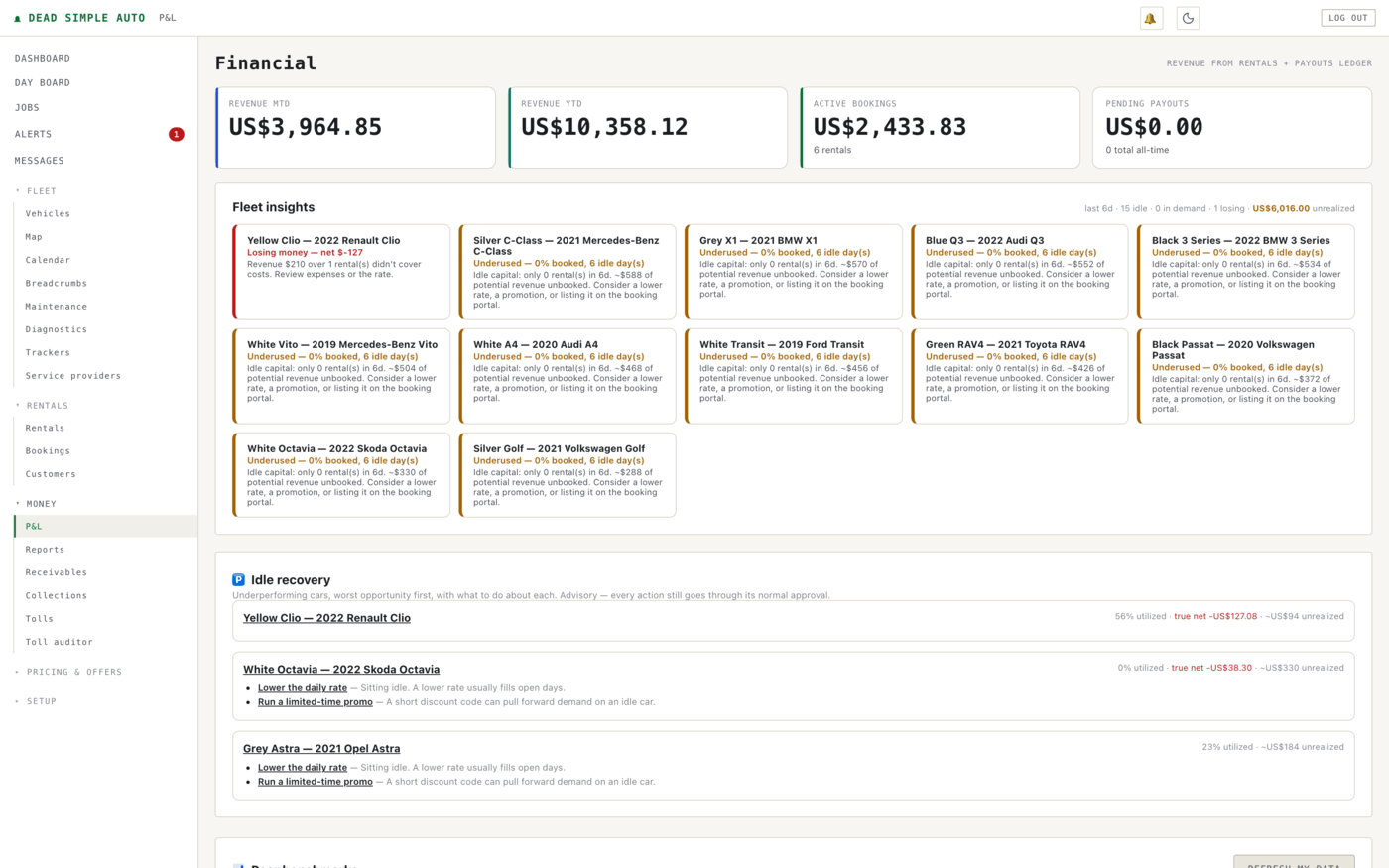
Each card tells you plainly what the car is doing: earning, underused, or losing money. The honest part is how loss is calculated. If you enter a car’s carrying costs — loan or lease payment, insurance, depreciation — the P&L prorates them by calendar days, not rental days. A financed car that sat idle all month shows its true net as a loss, because the payment came out of your account whether it rented or not. Alongside true net you get a break-even utilisation figure: the share of days the car must rent just to cover its own carrying costs. Carrying costs are optional; leave them out and the P&L is plain revenue minus expenses.
Below the fleet cards, the idle-recovery list ranks underperformers worst-first with a concrete action for each — lower the rate, run a promotion, list it on the booking portal. It is advisory: every action still goes through its normal approval.
Each vehicle also has a lifetime cost-of-ownership view: acquisition cost, expenses, and carrying costs over the car’s whole life, ending in a buy/hold/sell hint. It is a hint, not a command.
Security deposits and recovery billing
Deposits are managed on the rental itself: hold a deposit, deduct from it, release it. Every movement lands in a ledger, so you can always reconstruct what was held and why.
When a rental closes, the software gathers deduction suggestions from four sources: imported tolls, logged incidents, the AI damage comparison of check-in versus check-out photos, and policy breaches (restricted zones, mileage overage, off-site return). Recovery billing adds two more computed suggestions: fuel shortfall and late return, with grace bands so a few minutes late costs nothing, caps so a suggestion can’t run away, and an automatic skip of fuel charges for EVs.
Note: A suggestion is exactly that. Nothing moves from the deposit until you approve the deduction, and you can preview every figure before anything is applied.
Tolls
Money → Tolls imports your toll authority statement.
CSV works for every agency; PDF statements and photos are read by vision
(up to five pages); or forward the statement email and drop the
.eml file here — the attachment is pulled out for you.
Statement times are interpreted in your organisation’s timezone.

Each charge is matched to the rental that was active when it hit, by vehicle and timestamp, and lands in the Ready to bill queue. Billing is your click, not the importer’s, and you can tick a box to email the renter an itemised toll notice when you bill.
Toll auditor
Money → Toll auditor answers a different question: is the toll authority right? Upload a statement or receipt — Word, PDF, image, or CSV, up to 8 MB — and each charge is read and cross-checked against the vehicle’s own GPS breadcrumbs.

A charge comes back confirmed when the car was near a toll road at that time, flagged when it demonstrably wasn’t — a likely billing error worth disputing — and no-gps when there is no trail to check against. Past audits stay on the page.
Receivables and the settlement statement
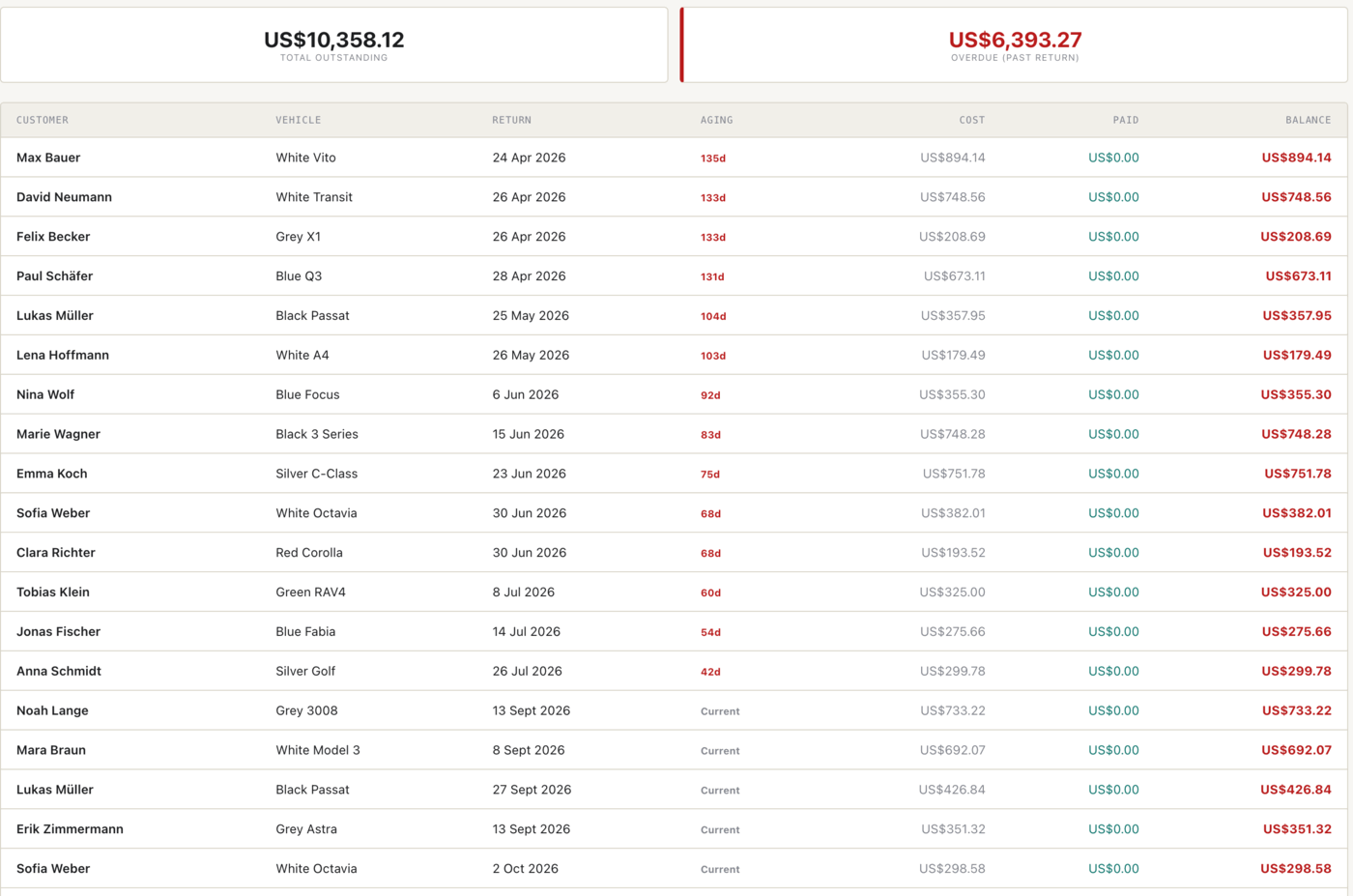
Money → Receivables shows what renters still owe you: rental cost minus payments logged, with a total-outstanding figure, an overdue figure for rentals past their return, and a per-rental aging column in days.
Each rental carries an invoice, and when a trip closes you can publish a settlement statement to the guest’s private trip link — an itemised breakdown of what they were charged. Every line has a “question this charge” action that routes the guest’s question straight to you, which resolves most disputes before they become chargebacks.
Note: The payments engine records and settles payments and is built to plug into providers, but real card capture is not done yet — the card provider is a stub. Log payments you take by other means, and the receivables math stays correct.
Collections
Money → Collections handles rentals that have gone past due. Each one climbs an escalation ladder — reminder, warning, final notice — and Run dunning now advances the ladder on demand.

If a delinquent renter still has the vehicle, the ladder can end in immobilisation — but only after you approve it, case by case, on this page. Nothing immobilises a car on a timer. And as everywhere in the product, the killswitch reports what really happened — requested, queued, sent — rather than claiming a car is disabled because a flag was written.
Expenses
Every expense is logged per car, by category — fuel, parts, labour, insurance, registration and so on — and flows into that car’s P&L. You can also photograph a receipt: the scan reads it and creates a draft expense, never a booked one. Check the draft, fix anything the scan misread, then book it yourself.
Reports
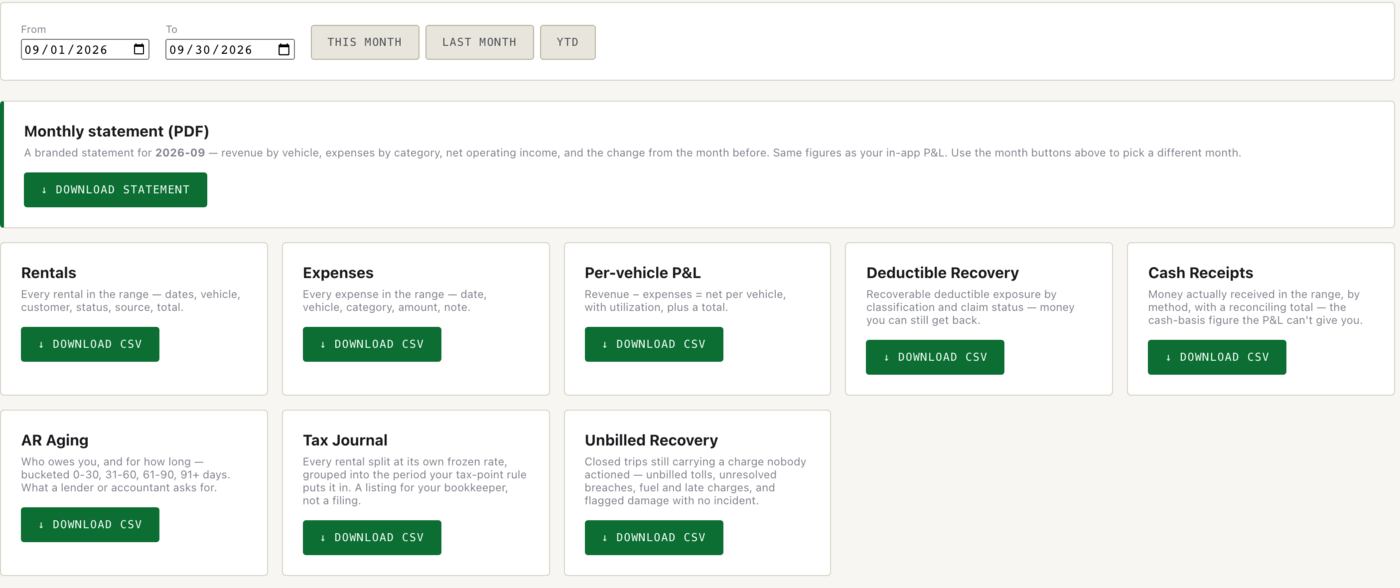
Money → Reports exports the numbers for your accountant. Pick a date range, then download CSVs: rentals, expenses, per-vehicle P&L, deductible recovery, cash receipts, AR aging, a tax journal, and an unbilled-recovery report of closed trips still carrying charges nobody actioned. There is also a branded monthly statement PDF — revenue by vehicle, expenses by category, net operating income — built from the same figures as the in-app P&L.
VAT and sales tax
Tax is configured per market: the label and rate follow your market profile, so an EU operator sees VAT where a US operator sees sales tax, and invoices and statements use the right words for where you actually operate.